
Agents
Agents in CompanyGPT are advanced systems designed to do more than just generate text. They analyze the user’s request, create a plan for completion, use tools to obtain information, and respond to the request.
Capabilities:
- Reasoning: Can break down complex problems into smaller units and process them
- Tool Usage: Can decide which tools to use for which tasks
- Action: Can execute tools to obtain information
You create and edit agents via Agent Builder in the left sidebar. The entry only appears if your role is allowed to create agents (see Permissions).
Components of agents
Section titled “Components of agents”Name and description
Section titled “Name and description”Agents should always have a name, as they can be selected by name in the model selection. In addition, a description can be stored that provides additional information.
Category
Section titled “Category”Each agent can be assigned to a category. If agents are shared between users within the company and the Agent Marketplace is used, they can be filtered by category there.
Instructions
Section titled “Instructions”The instructions are the actual prompt for the agent. This describes what the agent has to do, how it should behave, etc. Information on effective prompting for agents can be found here: Prompt Engineering. Especially with agents, it is advisable to use structured and cleanly formatted prompts.
Under Instructions source, you define where the instructions come from: With Inline, you write them directly in the Instructions field; with Prompt, you select a saved prompt and its Version.
Variables such as the current date, time, or current user can also be passed on.
AI model
Section titled “AI model”The AI model is the brain of every agent, as it analyzes requests, selects tools, and evaluates, summarizes, and returns results. Here, the creator can choose between all available models.
In addition to the model, the AI parameters can be adjusted. A detailed description can be found here: AI settings
In the Tools section, you define what the agent may use in addition to the AI model. Add opens the Tool Library. It is divided into Native (built-in features), Tools, MCP servers, and Actions. Under Favorites and Made by you, you find the entries you have marked or created yourself.
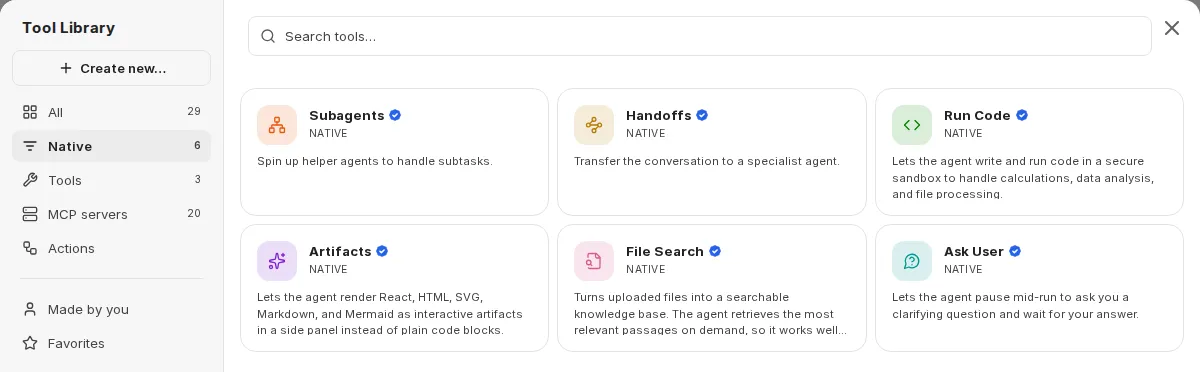
Clicking an added entry opens its settings. Use Remove from agent to take it out again.
Which entries are available depends on the configuration of your environment and the permissions of your role. Your organization can enable or block individual capabilities per role (see Agent capabilities in companyADMIN).
Web Search
Section titled “Web Search”Web search is activated via the model parameters of the selected AI model. Click on the AI model and open its settings. There you will find the “Web Search” toggle. For Google Gemini models, this is called “Grounding with Google Search”.
Additionally, you can add the WebFetch tool via an MCP Server. This uses a headless browser to crawl specific URLs – comparable to directly visiting a website in your browser.
For more information about web search, see: Web Search.
File Context
Section titled “File Context”File Context is not an entry in the Tool Library but a separate section under Tools in the agent form. Files added there are converted to text. The full text is included in the agent’s context with every message. This is suitable for a few key documents the agent should always reference. You can only upload files for File Context once the agent has been created.
Run Code
Section titled “Run Code”With Run Code, the agent can write and run code in an isolated environment, for example for calculations, data analysis, or file processing. Files you add in the settings of this entry are available to the agent.
For more information, see: Code Interpreter.
Artifacts
Section titled “Artifacts”With Artifacts, the agent renders React, HTML, SVG, Markdown, and Mermaid as interactive artifacts in a separate area next to the chat instead of plain code blocks. Under Mode, you choose:
- Normal: The agent receives the standard instructions for artifacts.
- shadcn/ui: Instructions for the shadcn/ui component library are added as well.
- Custom: Artifacts are still rendered, but no built-in instructions are added. Write your own in the agent’s instructions.
More information about artifacts can be found here: Artifacts.
File Search
Section titled “File Search”Files added under File Search become a searchable knowledge base. The agent retrieves the most relevant passages on demand. Retrieval works as RAG (Retrieval Augmented Generation) using similarity searches between queries and content. Only relevant text passages are used. This contrasts with file context, where the entire content is always in context.
For more information, see Prompt Engineering / RAG
Ask User
Section titled “Ask User”With Ask User, the agent can pause its run, ask you a clarifying question, and wait for your answer. The question appears in the chat as a card; if the agent asks several questions, a form takes you through them step by step. As soon as you have answered, the agent continues with your input.
Memory
Section titled “Memory”With Memory, the agent can save, update, and delete memories about you during the conversation. A card in the chat shows when the agent has saved or deleted a memory.
If Keep memories separate for this agent is enabled, the agent uses its own memories. They are kept separate from your shared memories and from those of other agents; the agent then does not see existing shared memories.
This entry is only available if memories are enabled for you. For more information, see Memories.
Subagents
Section titled “Subagents”With Subagents, the agent can delegate subtasks to helper agents. Subagents run in their own isolated context window: verbose tool output stays with the subagent, and only a summary returns to the agent. In the entry’s settings, turn on Enable subagents and use Add subagent to select up to 50 agents. With Allow self-spawn, the agent can also delegate subtasks to a copy of itself; this also works if no other agents are selected.
Handoffs
Section titled “Handoffs”Under Handoffs, you define agents to which the agent can transfer the conversation when specific expertise is needed. Each handoff creates a transfer tool that the agent uses to route the conversation, including its context, to the specialist agent. In the Handoff description, you specify when to hand off. Add handoff agent allows up to 10 handoffs.
MCP Server
Section titled “MCP Server”You add MCP servers via the Tool Library in the MCP servers area. In the server’s settings, under Tools in this server, you select which tools the agent may use, individually or with Select all.
With Defer loading, a tool is only loaded when the agent needs it instead of being active the whole time. This is particularly useful for servers with many tools. By default, Defer loading is turned on for all tools. Undefer all tools or Defer all tools changes the setting for all tools of the server at once.
Only people whose role allows it can create new MCP servers. For more information, see MCP Server.
In the Tools area of the Tool Library, you find built-in tools that can be combined with MCP tools:
- OpenAI Image Tools: generate and edit images
- Gemini Image Tools: generate images with Google Gemini image models
- Calculator: simple and complex calculations
Whether the image tools can be used depends on which image models are set up in your environment.
Actions
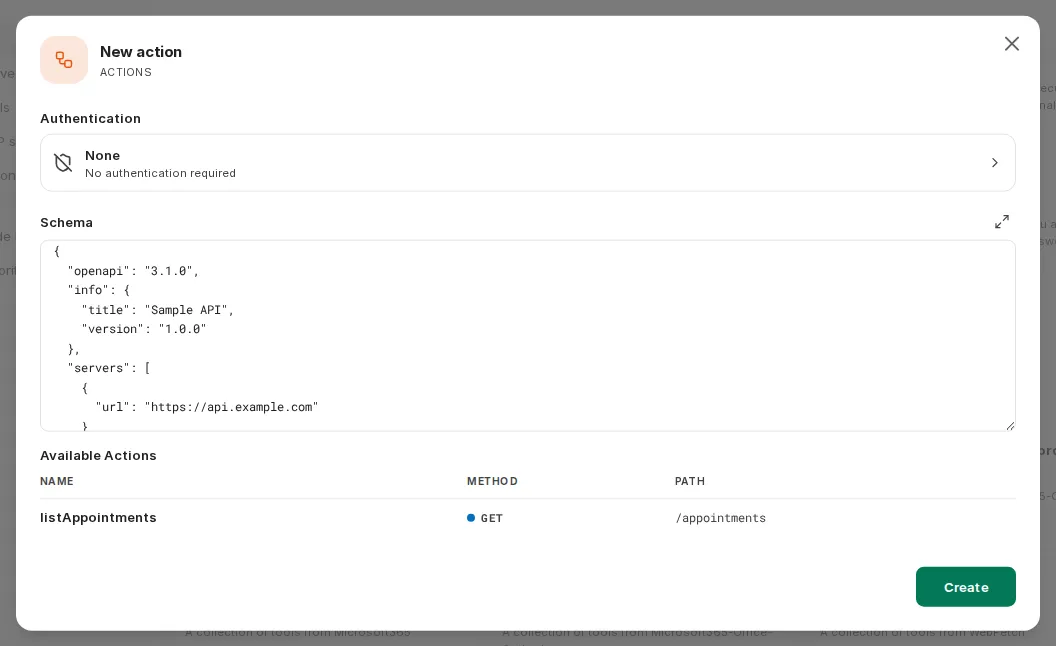
Section titled “Actions”Actions are external API interfaces that can be connected directly via OpenAPI-compatible schemas. You create a new action in the Tool Library via Create new… → Actions. This is only possible once the agent has been created. In the New action dialog, you choose the Authentication (None, API Key, or OAuth) and paste the Schema. Below it, CompanyGPT shows the Available Actions from the schema.
Skills
Section titled “Skills”In the Skills section, you define whether and which skills the agent may use. For details, see Adding skills to agents.
Conversation Starters
Section titled “Conversation Starters”Under Conversation Starters, you add sample requests that users can use to start a conversation with the agent. In the Agent Marketplace, they appear in the agent’s detail view.
Contact Information
Section titled “Contact Information”Under Support Contact, each agent can be assigned contact information for the creator, which is useful for feedback on shared agents.
Advanced Settings
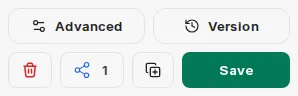
Section titled “Advanced Settings”Advanced opens the agent’s Advanced Settings. Under Essentials, you set the maximum number of agent steps.
Max Agent Steps
Section titled “Max Agent Steps”Limits how many steps the agent can take in a run before giving a final answer. Without your own value, CompanyGPT uses a default of 150 steps. If you enter your own value, it applies instead of the 150 steps, even if it is higher. A step is either an AI API request or a tool usage round. For example, a simple tool interaction involves 3 steps: the initial request, the tool usage, and the follow-up request.
Version
Section titled “Version”Each time changes to an agent are saved, a version is created. Version opens the Version History. There you can view these versions and bring back an earlier version with Restore. This is useful if you want to undo changes.
Permissions
Section titled “Permissions”Who may use, create, and share agents is set by administrators in companyADMIN: under Access → Roles → open a role → companyGPT tab, feature Agents with the permissions Use, Create, Share, and Share publicly.
By default, users may use and create agents but not share them. Your organization can configure this differently. If you have questions, contact your administrator.
Sharing Agents
Section titled “Sharing Agents”If your role allows sharing agents, you can share them. To do this, click the Share button at the bottom of the agent form.
You can choose whether the agent should be shared globally, with specific users, or with user groups.
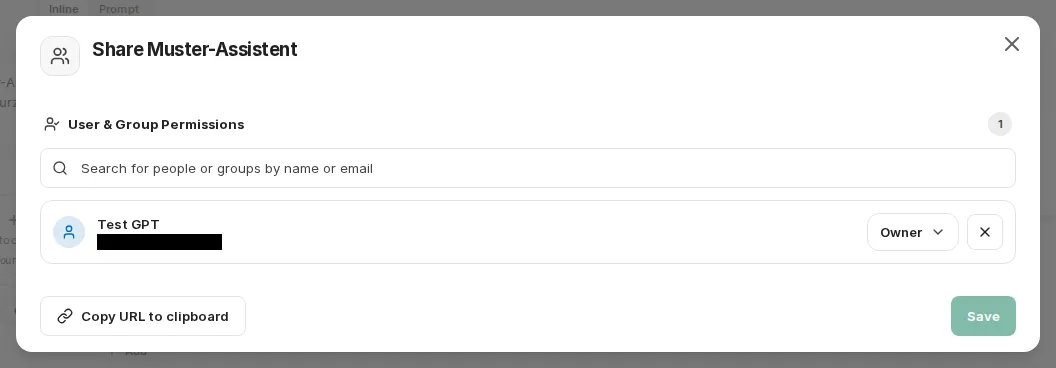
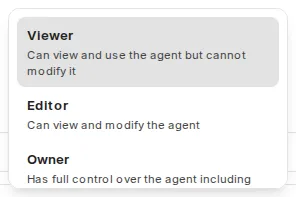
You can select the rights with which other users can access the agent.
Agents API
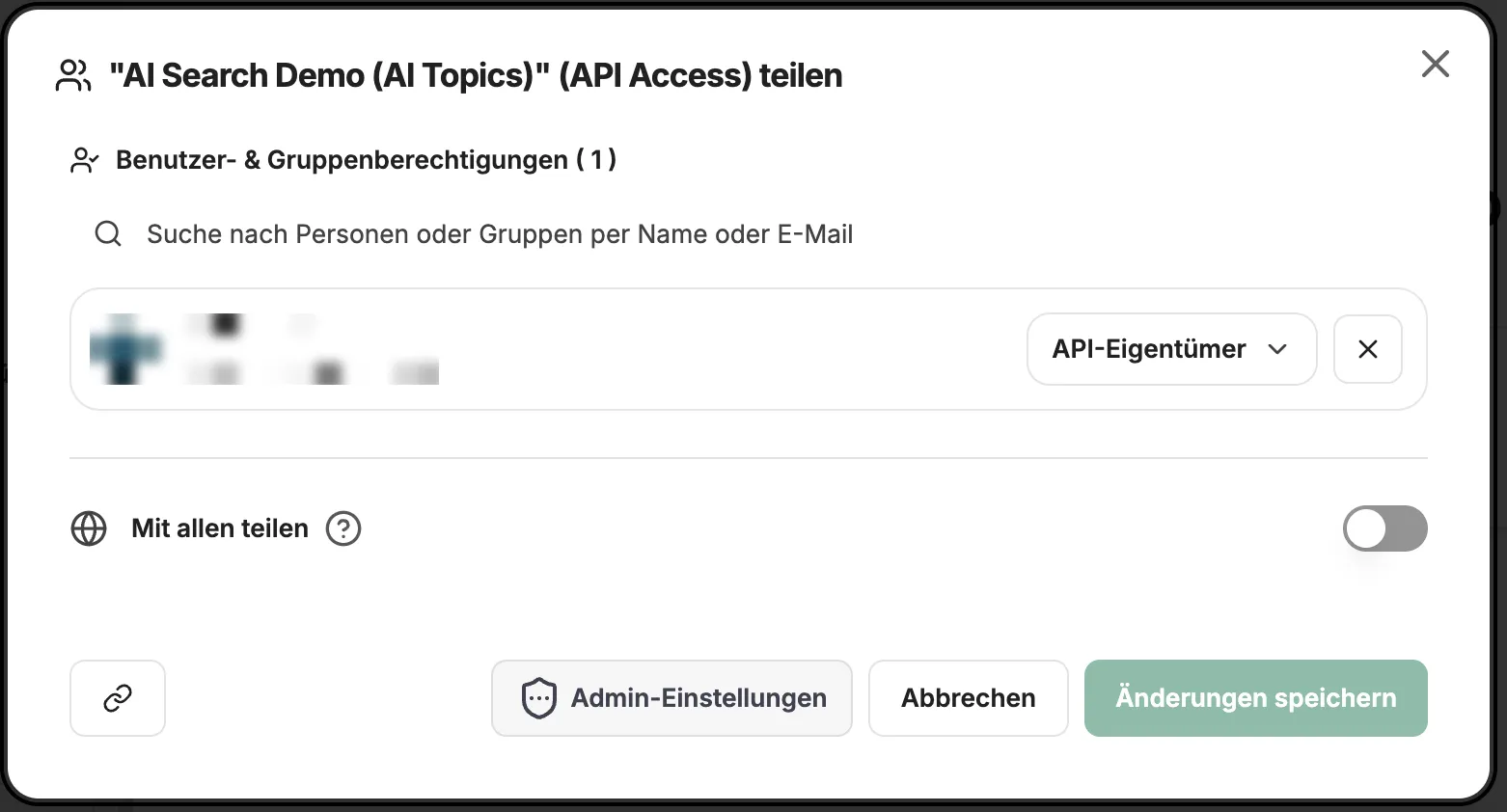
Section titled “Agents API”Agents can also be accessed externally via the Agents API. This requires your role in companyADMIN to have the Remote agents permission. Your own agents are then automatically available to you via the API. With the Remote Access button, you can share API access to an agent with others if your role allows it.

Our agents
Section titled “Our agents”At Agents you will find a selection of agents that we have developed for various use cases. You can use these directly or as a template for your own agents.
Agent Marketplace
Section titled “Agent Marketplace”Shared agents as well as your own agents can be viewed via the Agent Marketplace. You open it via Agent Marketplace in the left sidebar.
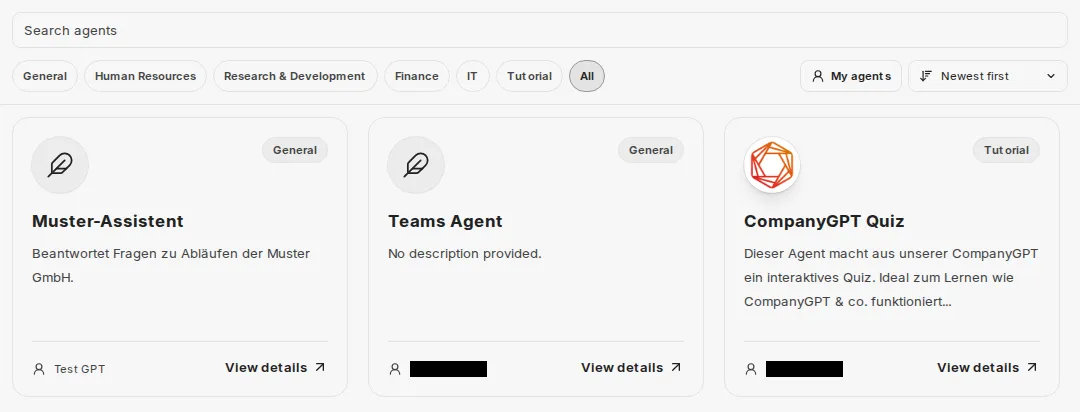
With Sort by, you sort the agents by popularity (Popular), by creation date (Newest first, Oldest first), or by the name of the person who created them (By creator name). My agents shows only the agents you created yourself.
Clicking an agent opens its detail view. There, Start Chat starts a chat with the agent. If the agent has conversation starters, you see them under Try a conversation starter: clicking one opens a new chat with the text, which you can adjust before sending if needed.