
Chat
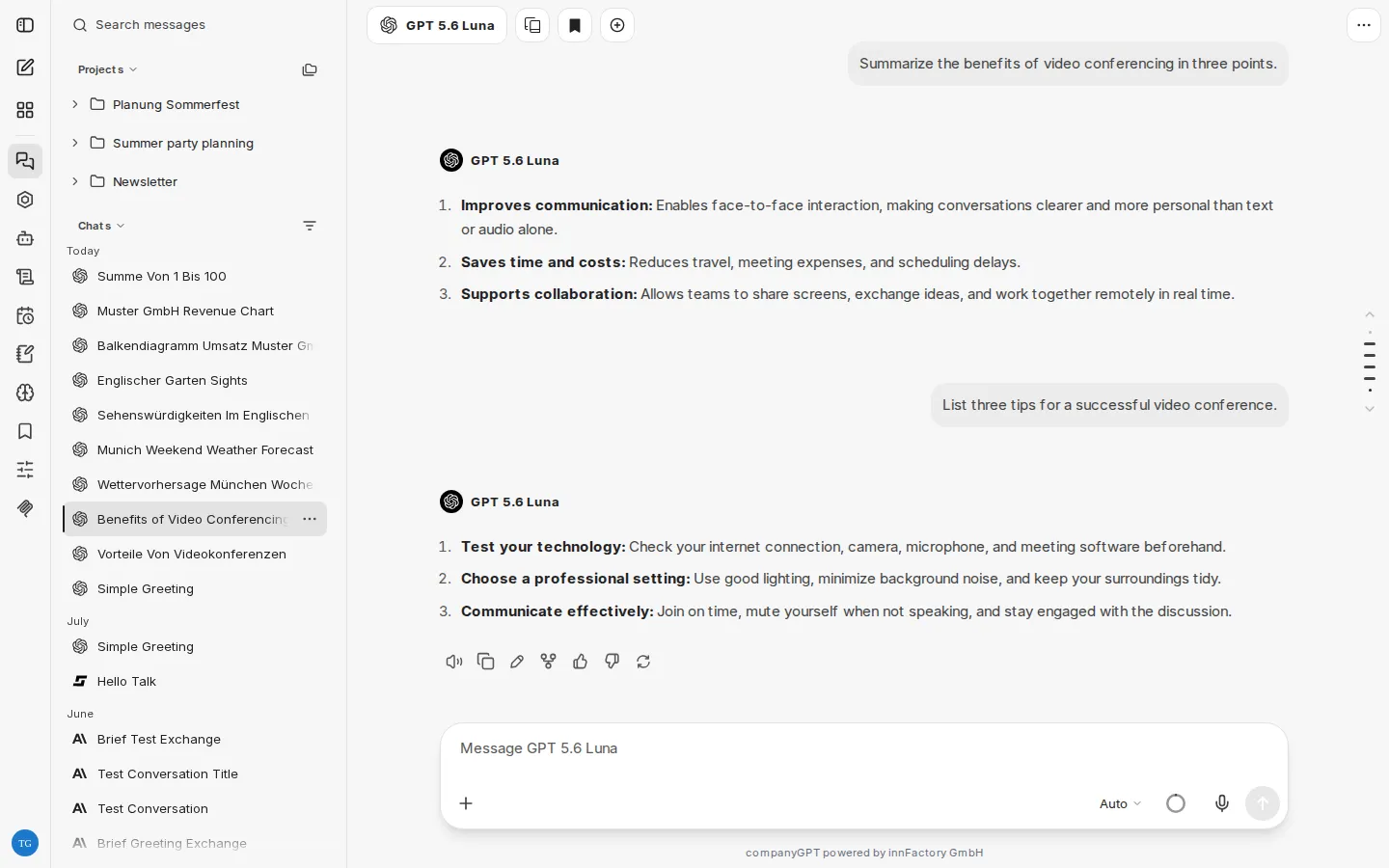
The chat is the main interface for communicating with the various language models and agents.
Prompt input
Section titled “Prompt input”Chat messages or prompts are entered via the input field. Press Ctrl + Enter (macOS: ⌘ + Enter) or use the send button to send a message, and press Enter to add a new line. You can change this behavior in the Settings. A message can also consist of attachments only.
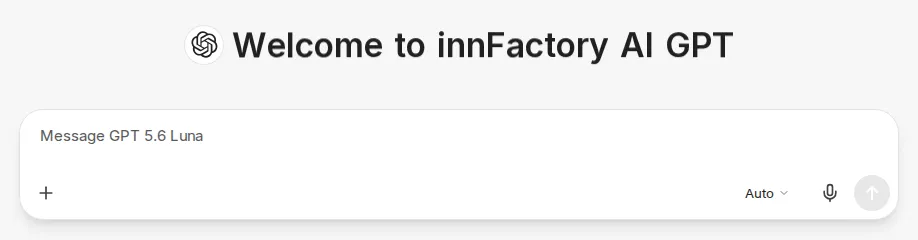
Use the plus icon on the left of the input bar (Attach and tools) to attach files and turn on tools, see Integrations. For models with reasoning, choose the reasoning effort with the button on the right of the input bar that shows the current level (for example Auto), see New chat interface.
Messages during a running response
Section titled “Messages during a running response”You can keep typing while a response is being generated. When you send, the new message is included in the running response (Steer), the running response is stopped right away and continues with your message (Interrupt), or the message is queued for after the response (Queue). With Interrupt, the part of the response generated so far is kept. What Enter does by default is set in the Settings. The send button also lets you choose for individual messages. If the running response cannot be steered, the message is queued.
Context indicator
Section titled “Context indicator”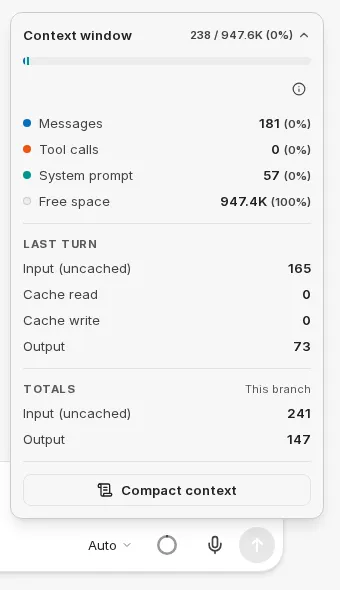
The circle icon in the input field shows how much of the model’s context window the current chat uses. When space is running low, the indicator changes color. Hover over it or click it to see the usage. Use the arrow next to the numbers to expand the breakdown, for example by Messages, Tool calls, System prompt, and Free space. Below that, you see the tokens of the last turn (Last turn) and the totals (Totals). If available in your environment, the breakdown also shows the cost and the share of your balance already used.
In the same pop-up, you can also compact the context yourself with Compact context: CompanyGPT replaces the conversation so far with a summary. Earlier messages stay visible in the chat but are no longer sent to the model.
Integrations
Section titled “Integrations”In addition to the actual prompt input, the context can be further expanded by:
- File Search
- Web Search
- Skills
- Run Code
- Artifacts
- MCP Server
- Memory, if available in your environment
You turn these on in the respective chat via the plus icon in the input bar (Attach and tools). Active tools appear as chips in the input bar; use the x in a chip to turn them off again. For more information, see User Interface.
Messages
Section titled “Messages”The message history develops over time within the conversation between the user and the AI model(s). After each message, the user can use a different model or agent, which of course always receives the entire previous context.
Message options
Section titled “Message options”Messages in the chat have quick actions:
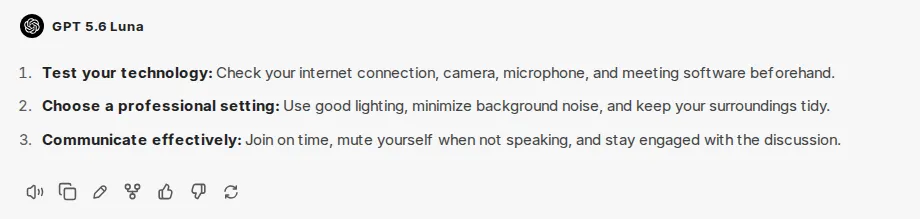
- Regenerate and message variants: Using Regenerate, several response variants can be generated, between which you can switch.
- Read aloud: Using Text to speech, the message is read aloud with the selected engine.
- Copy to clipboard: Copies the entire content of the message to the clipboard.
- Edit: Opens an editor in the message, see Editing messages.
- Fork icon: Creates a new chat from a specific message with all previous messages. This is helpful if, for example, you want to think in different directions. Choose which messages are included: Visible messages only, Include related branches, or Include all to/from here.
- Feedback: Rate a response with thumbs up or down and optionally add a comment.
Editing messages
Section titled “Editing messages”Edit opens an editor directly in the message:
- Your own messages: Update & rerun sends the changed message and generates a new response. Save keeps the change without generating a new response. If you have not changed anything, Rerun generates a new response to the unchanged message, for example after a cancelled response.
- AI responses: Save keeps your change in the history, for example to correct a response before you continue. Rerun, on the other hand, generates a new response and discards your changes.
Cancel closes the editor without applying any changes.
Quoting
Section titled “Quoting”To quote specific content, select it in a message and choose Add to chat. The selected text is attached to your next message as a quote. You can also collect several passages one after another.
Code, diagrams, and artifacts
Section titled “Code, diagrams, and artifacts”- Code blocks can be copied with Copy code or downloaded as a file with Download code.
- Mermaid diagrams are rendered directly as diagrams. Use Export diagram to save them with Export as SVG or Export as PNG.
- Artifacts open in a separate area next to the chat. Use Enter full screen to view an artifact in full screen.
Tool calls
Section titled “Tool calls”When a model or agent uses tools, such as web search or an MCP server, CompanyGPT shows the calls in the response. Several consecutive calls are grouped into one row that you can expand; failed calls are counted in it. If you want the details to always be expanded, enable Auto-expand tool details in the Settings.
If an agent reaches the maximum number of steps for one response, it stops and shows the notice Reached the tool call limit for this turn. Everything done up to that point is kept. Choose Keep going to let the agent continue from where it stopped, or Answer now to have it answer immediately with what it already has.
Comparing two models
Section titled “Comparing two models”Use the Add multi-conversation button in the header to have the same message answered by two models. The previously selected model then appears as an additional row above the input field; in the model selection you choose the second model. After sending, both answers appear side by side. Use the x in the additional row to end the comparison.
Temporary chat
Section titled “Temporary chat”Use the Temporary Chat button in the header to start a temporary chat. It does not appear in your chat history and is deleted automatically. While a temporary chat is active, the header shows a corresponding indicator.
If new chats should always start as temporary chats, enable Temporary Chat by default in the Settings.
Sharing and exporting
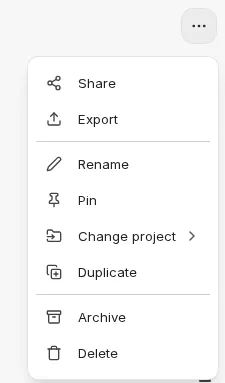
Section titled “Sharing and exporting”Message histories can be shared or exported to different file formats. In an open chat, both are available in the Chat options menu (three dots at the top right of the header) via Share and Export.
Sharing
Section titled “Sharing”Create a shared link generates a link to the chat. Your name stays private. Images and files in the chat are only visible to others if you enable Share files in this conversation. Show QR Code additionally gives you a QR code.
The address of the link stays the same. Edits to messages that are already shared appear right away. Messages you add after sharing only become visible when you select Update link. This publishes the current state of the chat and your current file-sharing choice under the same address.
Manage Access lets you see and change who can open the link. Delete Link removes the share. Chats with an active link are marked in the chat history. An overview of all your shared chats is available in the Settings under Shared chats.
Export
Section titled “Export”Message histories can also be exported. This has the advantage that they can be saved as files in different formats. Histories in JSON format can also be imported again.
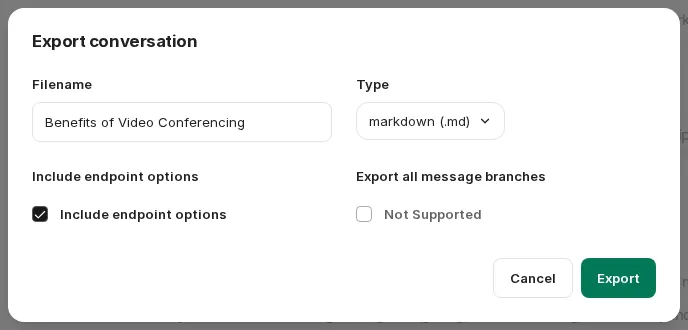
To export, choose a Filename and the Type: Markdown, text, JSON, CSV, or screenshot (PNG).
In addition, depending on the file format, the following settings can be made:
- Include endpoint options: The model names are also saved in the information (not for CSV and screenshot).
- Export all message branches: If there are branches, they can also be exported (JSON and CSV only).
- Recursive or sequential? (JSON only): Display of messages within the JSON object, either as a flat list of messages or as a recursive list with nested messages.