
Providers and models
Under Configuration you decide which providers and models people see in CompanyGPT and under which name. Three pages belong to this:
- Providers and models – access per provider, one role at a time
- Model access – every role and provider in one table
- Labels – readable names for models and how the model picker looks
Models belong to roles, not to groups. An Entra group gets its models through the role the role sync gives it. Because everyone has exactly one role, the result is unambiguous.
Providers and models
Section titled “Providers and models”Without a restriction the base configuration applies: everyone sees every provider and model. The Access per provider table shows what applies:
| Column | Content |
|---|---|
| Provider | The provider, with a badge if applicable |
| Models | Number of models |
| Access | All models, “x of y models” or No access for the role chosen in the filter |
| Source | librechat.yaml (base configuration, open to everyone) or companyADMIN (restricted here) |
The Role filter shows what one role gets. Use Search provider or model … to find an entry.
Badges on a provider:
- Custom endpoint – a custom provider. A restriction applies to this endpoint only. For a role without access it is hidden completely in CompanyGPT.
- Live list – the model list is fetched from the provider. Here only the whole provider can be blocked, not single models.
- Save again – an older restriction does not work as shown. Check it and save it again.
Changing access for a role
Section titled “Changing access for a role”- Expand the provider. You see which role holds which model.
- Pick the role under Edit a role:.
- Tick or untick “Role uses Provider” and the ticks of the individual models.
- Click Save. If you take models away, companyADMIN asks first and lists the models that will no longer be available.
If a provider that was open so far is restricted for one role, every other role keeps all models that exist at that moment. New roles, however, only see the provider once you grant it to them. Open for everyone lifts the restriction again.
Keep in mind:
- At least one role must keep the provider.
- ADMIN is a role like any other. If you take access away from ADMIN, administrators lose the provider too.
- For built-in providers a role without access still sees the provider in CompanyGPT, but with an empty model list. Leave every role at least one model to avoid that empty entry.
- After a change, people reload CompanyGPT to see the new selection.
AI Gateway
Section titled “AI Gateway”If the innFactory AI Gateway is set up in your environment, the page shows The AI Gateway manages providers, models and budgets. You then only decide here which role sees which models in the chat. Open gateway takes you to the gateway; administrators with configuration rights can open it.
Model access
Section titled “Model access”Model access shows every role and provider in one table: providers as rows, roles as columns, ADMIN and USER first.
- A tick means the role holds the provider or model. A dash means only some models. Expanding a provider shows its models; Show all models expands every provider.
- Each provider shows whether it is open to everyone (librechat.yaml) or restricted by companyADMIN.
- Clicking a column header opens that role’s models.
To change access:
- Tick or untick. Changed providers are marked.
- Click Save or Discard in the save bar.
- If you take models away, Take models away? asks first and lists per role what is removed. Confirm with Save and take away.
Here too, at least one role must keep every provider. If someone else has changed a provider in the meantime, companyADMIN saves nothing and shows Changed meanwhile – reload. Then check the stored state and save again.
Models per role and person
Section titled “Models per role and person”- Role → Models & providers tab shows and changes a role’s models, see Roles.
- User → Models tab shows which models a person sees, see Users.
Labels
Section titled “Labels”Labels give models readable names in the model picker, such as “Claude fast” instead of the technical model ID. A label can also point to a specific agent.
Management
Section titled “Management”With Manage model labels from companyADMIN, companyADMIN takes over the labels. As long as the box is unticked, the labels from the base configuration apply, otherwise the technical model IDs. Creating the first label already copies the existing labels from the base configuration here for editing.
To stop managing, untick Manage model labels from companyADMIN. The dialog Stop managing labels? asks first; confirm with Stop managing. Afterwards the labels from the base configuration apply again, and every label created or changed here is lost.
All labels
Section titled “All labels”The All labels list shows Label, Model, Source and In effect. The labels appear in the model picker in this order. Preselected marks the label preselected for new chats. If In effect says “No”, the model no longer exists; CompanyGPT hides such a label.
Add label and a click on a label open the detail page:
| Section | Fields |
|---|---|
| Display | Label (at most 128 characters), Description (optional) – shown in the picker below the label, Group and Group icon – group the picker, Icon URL, Preselected for new chats |
| Target | Provider and Model, or as provider Agent (one specific agent) and then the Agent |
For OpenAI models there is also Use the OpenAI Responses API. Move up and Move down change the order. Remove label in the danger zone removes the label from the picker for everyone. Running chats keep their model as long as Only labelled models may be used is off. If it is on, running chats with this label stop working afterwards; a new model has to be picked there.
The Models without a label (N) card lists models that still appear with their technical ID. There you add a label for single models or take all of them at once with Adopt all.
Picker in the chat
Section titled “Picker in the chat”As long as companyADMIN manages the labels, you control here how the model picker looks. Apply this section’s settings with Save.
- Show labels first in the picker – labels are at the top.
- Providers that stay selectable – ticked providers keep their own entry in the picker next to the labels. All others are reachable only through labels. If no provider is ticked, CompanyGPT shows all providers. This is a display setting only and blocks no model. A group must not have the same name as a ticked provider, or its labels disappear from the picker.
- Only labelled models may be used – people only see labels; CompanyGPT hides the free model picker. If providers are ticked as well, they appear, but their models without a label fail when sending. Switching it on asks first (Allow only labelled models?).
Result for users
Section titled “Result for users”In the model picker people see only the providers and models their role may use, grouped and with the labels you set.
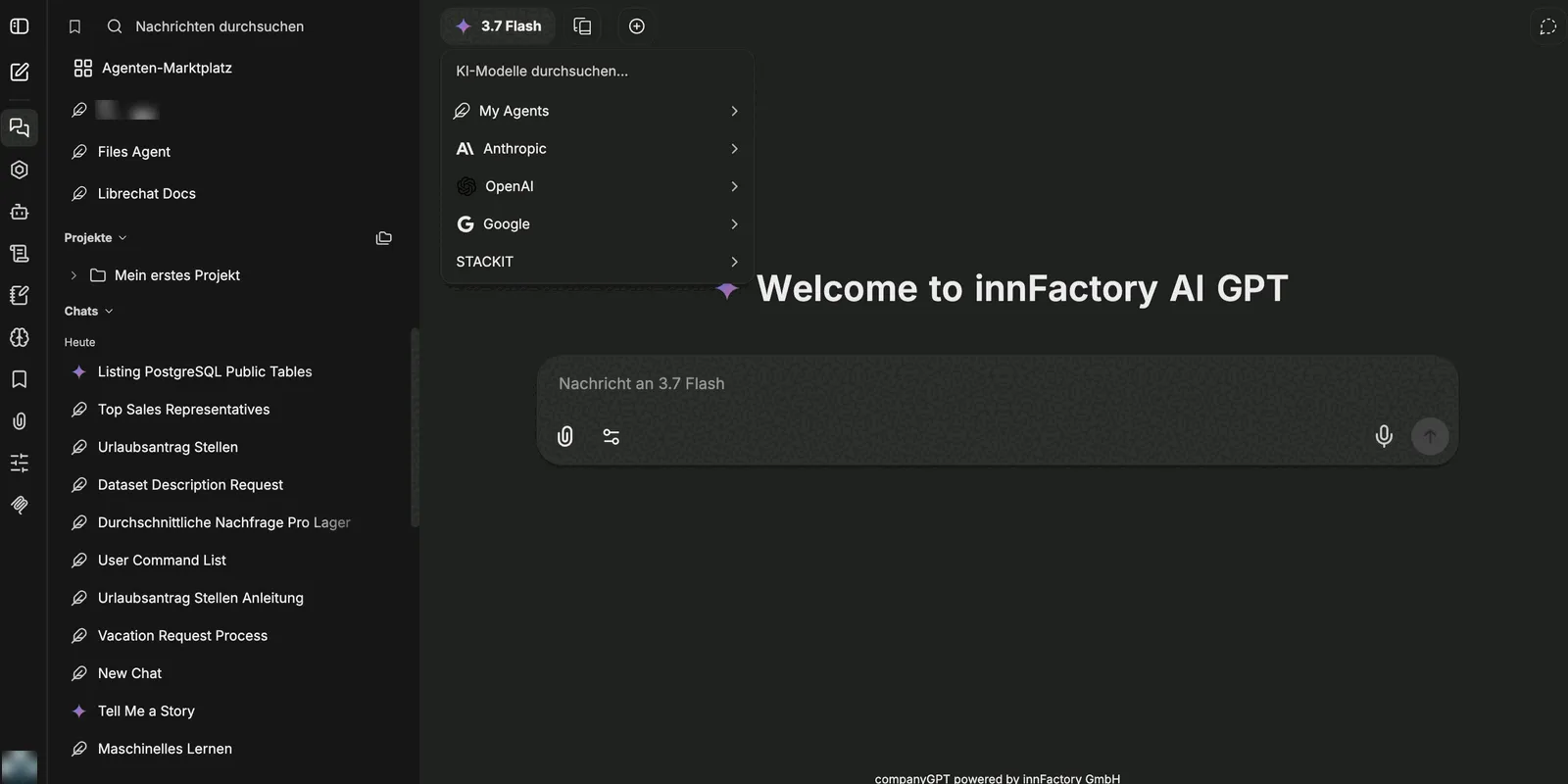
Which models exist in your environment in general is described in Model selection.