
Structured data
A pure RAG search finds text passages, but cannot calculate sums, quantities or rankings. For recurring document types – invoices, contracts, inspection reports – companyRAG can therefore also extract structured data from the documents: a language model fills a table schema you define, which can then be queried via SQL.
This gives you two access paths for the same collection that can be combined: semantic search over the text and structured queries over the extracted fields.
Enable the Extract structured data (Beta) option when creating the collection of the type Documents. The option can only be switched on at creation.
Defining the schema
Section titled “Defining the schema”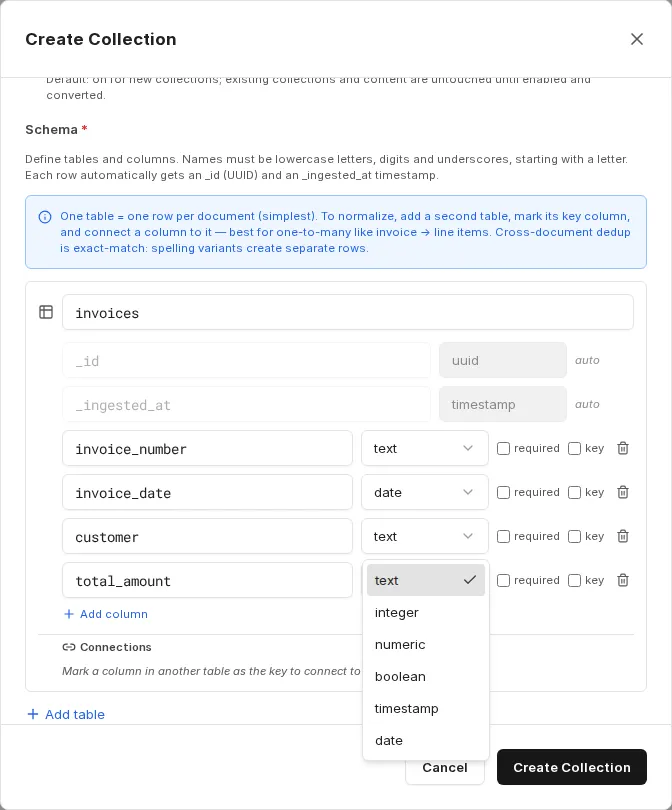
The simplest case is a table with one row per document. For each column you define a name and data type, and optionally mark whether the field is required or serves as the key.
Available data types: text, integer, numeric, boolean, timestamp, date.
Names must consist of lowercase letters, digits and underscores and must start with a letter. Every row automatically receives the fields _id (UUID) and _ingested_at (timestamp).
In addition, you can describe under Extraction instructions (optional) which information should be extracted, and limit the number of pages to evaluate under Max pages to scan per document (optional) – for example to the first five pages if the relevant details always appear at the beginning. This reduces cost and runtime.
You can adjust the extraction instructions later under Edit collection. The change applies to files indexed from then on; documents already processed keep their extracted data. The schema itself is read-only after creation.
Multiple tables and relationships
Section titled “Multiple tables and relationships”For one-to-many relationships – for example an invoice with several line items – mark the key column in the first table (such as the invoice number), add a second table for the line items and connect its matching column to that key.
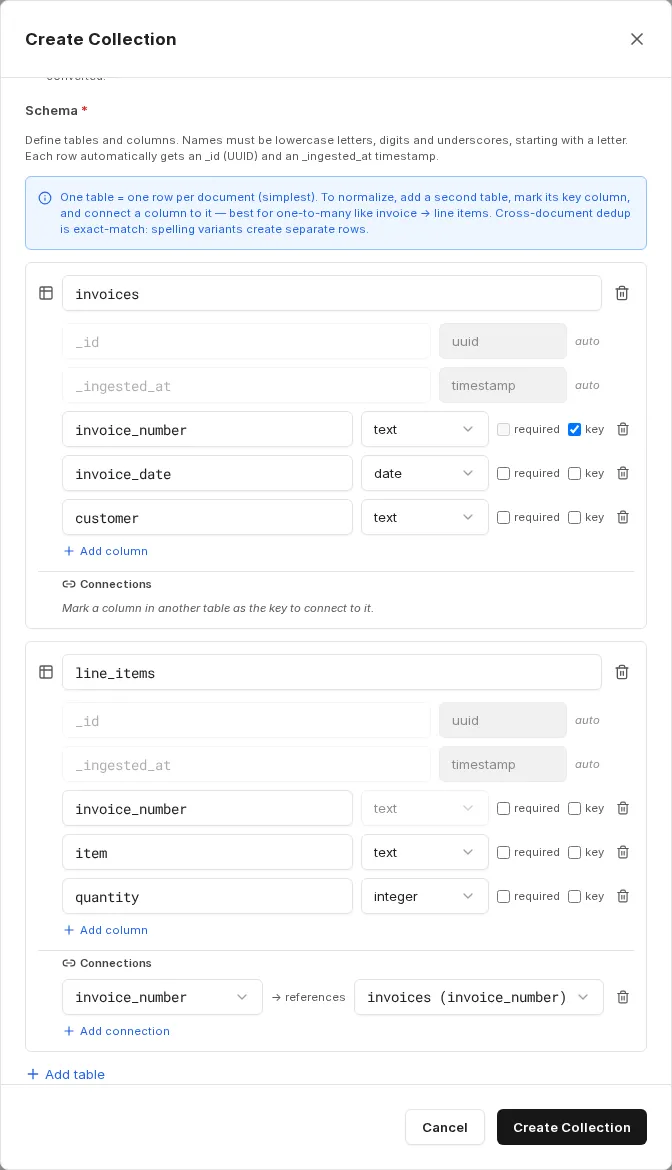
The connection is used as a JOIN hint in queries. One document then produces several rows in the line item table, while the header data is stored once in the first table.
Extraction status
Section titled “Extraction status”If extraction fails for a document, the document is still indexed for semantic search. Under Files it then has the status Indexed (warning).
Querying
Section titled “Querying”The extracted tables are queried with the SQL tools of the ai-search MCP server, just like dataset collections. Which tools an agent needs for this is described in Using companyRAG in CompanyGPT.