
Setting up the agent
A bundle is not filled in by hand but by an agent. For that the agent needs three things: access to search, the Knowledge connection with write access, and a skill that lays down the rules of the format. It is created like any other agent under Agents → Create new agent.
Basic settings
Section titled “Basic settings”| Field | Recommendation |
|---|---|
| Name | a descriptive name, for example the name of the bundle |
| AI model | a small, fast model is sufficient — the work consists mostly of tool calls and text formatting |
| Category | General, unless a dedicated category exists |
| Instructions | a short system instruction pointing to the skill and the target collection |
Keep the instructions brief. What works well is the direction to always use the skill for documenting, combined with naming the target collection — in the example: “Always use the skill for documenting. ALWAYS run a search. The collection is ALWAYS: tutorial_wiki.”
The plus icon next to the Instructions field inserts context variables that are filled in at call time:
| Variable | Purpose |
|---|---|
| Current date | date for the timestamp field of a concept file |
| Current user | who triggered the change |
| UTC ISO date/time | timestamp in machine-readable form |
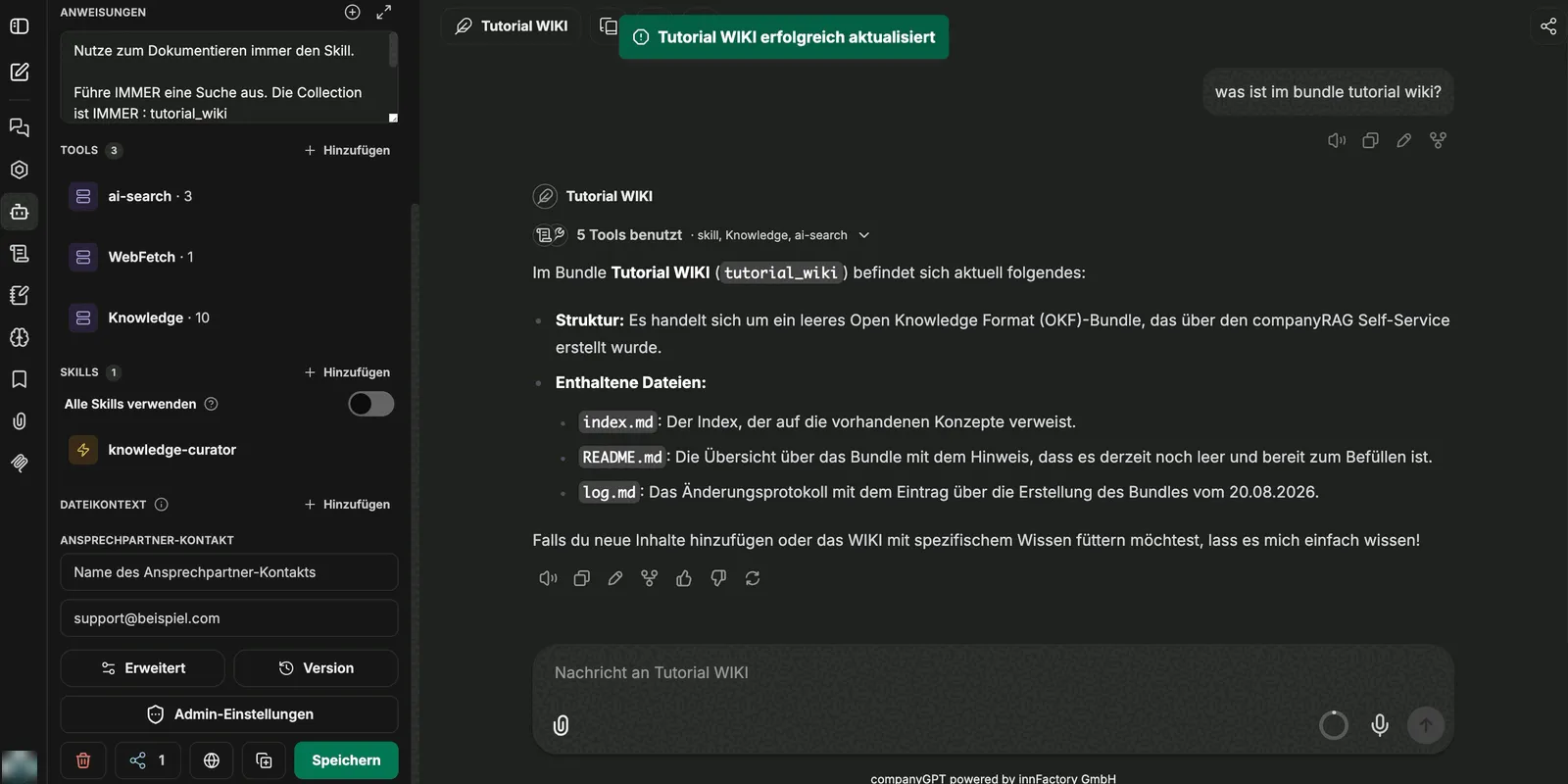
The tools are added under Tools → Add:
- ai-search: semantic search across the collections, together with the tools for reading content. Without it the agent cannot check what has already been documented.
- Knowledge: the connection to the OKF bundles — reading and writing. This is the tool used to write concepts, index and log.
- WebFetch: optional, for content from outside. See Creating and maintaining knowledge.
The Knowledge connection brings ten tools:
| Tool | Purpose |
|---|---|
okf_list_bundles | list the bundles you are allowed to read |
okf_read_index | read a bundle’s index |
okf_read_concept | read a single concept |
okf_write_concept | create or update a concept |
okf_delete_concept | delete a concept; index.md and log.md are excluded |
okf_update_index | update the index |
okf_append_log | add an entry to the change log |
okf_validate_bundle | check the bundle for errors |
okf_commit | finalize the changes: for GitHub bundles in pull request commit mode it opens the pull request. In direct commit mode and for SharePoint, the changes are already saved when they are written. |
okf_get_update_context | determine what has changed since the last run |
Personal GitHub token (optional)
Section titled “Personal GitHub token (optional)”For bundles in GitHub, each person can store their own GitHub token. The Knowledge connection has the variable GitHub PAT (personal access token) for this. You enter the value in the chat under MCP Settings for the Knowledge server. Enter only the token itself in the field.
If a token is stored, the Knowledge connection uses it for GitHub bundles. Reading and writing then go through your own GitHub account and its permissions. For the agent to be able to write concepts, the token needs write access to the bundle’s repository. Without a token of your own, the connection uses the access set up centrally for your environment, if there is one.
Bundles in SharePoint need no token. There, the permissions of your Microsoft account apply.
A skill for the rules
Section titled “A skill for the rules”The agent additionally receives a skill describing how to handle the format. The skill holds no content, only rules and workflows. In the example it is called knowledge-curator; it was created in-house and is not a shipped part of the product.
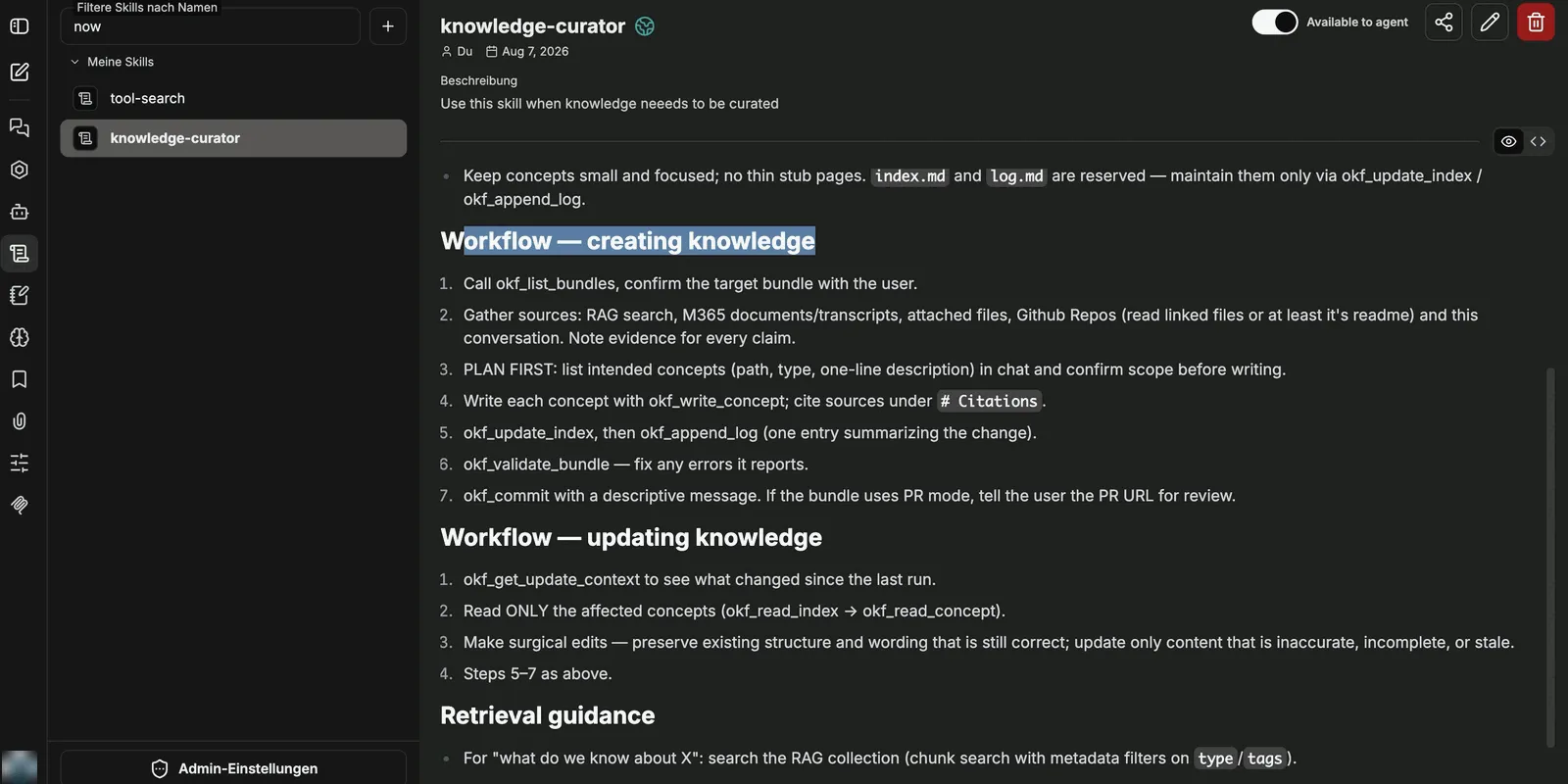
The following parts have proven useful:
Rules. Keep concepts small and focused, no thin stub pages. index.md and log.md are reserved and are maintained exclusively via okf_update_index and okf_append_log.
Workflow for creating knowledge.
- Call
okf_list_bundlesand confirm the target bundle with the user. - Gather sources — RAG search, M365 documents and transcripts, attached files, GitHub repositories — and note the evidence for every claim.
- Plan first: list the intended concepts with path, type and a one-line description in the chat, and have the scope confirmed.
- Write each concept with
okf_write_conceptand cite the sources in the references section. okf_update_index, thenokf_append_logwith one entry summarising the change.okf_validate_bundle— fix any errors it reports.okf_commitwith a descriptive message. If the bundle runs in pull request commit mode, report the PR URL for review.
Workflow for updating knowledge. okf_get_update_context determines what has changed; only the affected concepts are read (okf_read_index → okf_read_concept). Edits are surgical: existing structure and wording that is still correct stays, and only content that is inaccurate, incomplete or stale is replaced. Steps 5 to 7 then follow as above.
Retrieval guidance. For questions of the kind “What do we know about X?” the agent searches the RAG collection using metadata filters on type and tags.
First check
Section titled “First check”Whether the setup works shows in a simple chat question about the contents of the bundle. The agent reads the index and answers with the actual state — for a freshly created bundle that means the note that it is still empty, plus the listing of index.md, README.md and log.md together with the date of the log entry.