
Files
Under Files you see all files that have been added to the service – regardless of whether they were uploaded manually or synchronized via a source. The page is titled Documents.
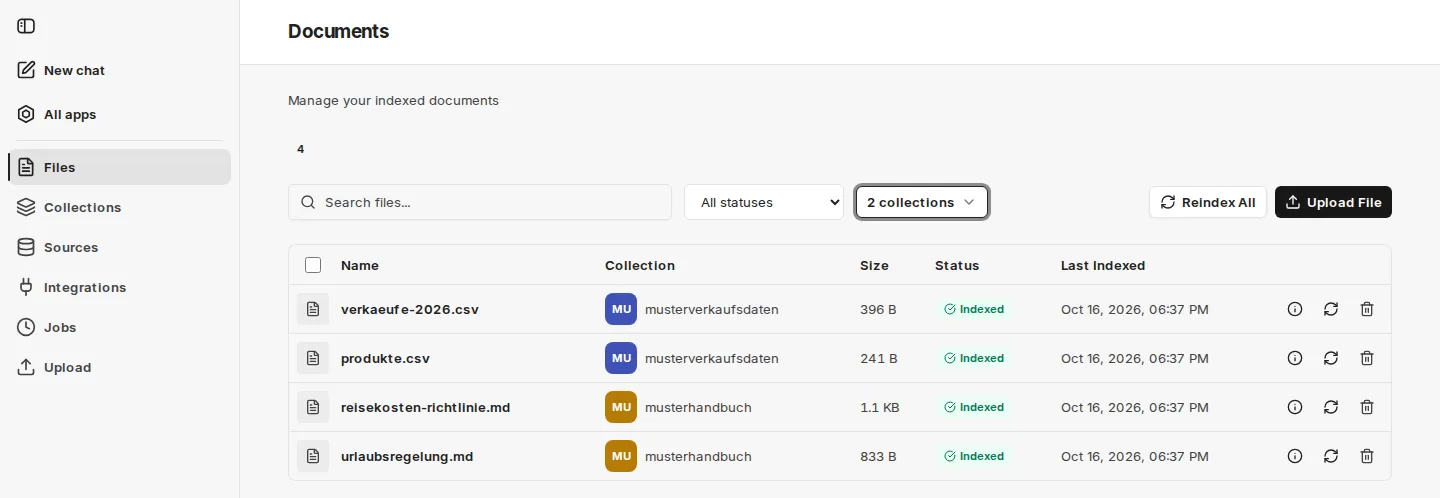
The overview contains:
- Name: Name of the document (partially truncated – hover to see the full name)
- Collection: The collection the file has been assigned to
- Size: File size
- Status:
- Pending: Indexing is still pending
- Indexed: The document has been indexed successfully
- Indexed (warning): The document is indexed for search, but a follow-up step such as structured data extraction failed
- Failed: Indexing was not successful; the reason appears when you hover over the status
- Last Indexed: Date and time of the last completed indexing
- Actions:
- Info icon: shows the file’s metadata
- Reindex: Creates a new indexing job
- Delete: Deletes the file from the service, including the associated jobs and the indexed form
Searching and filtering
Section titled “Searching and filtering”Above the list you search the files, filter by status and select one or more collections via Filter by Collection.
Working with several files
Section titled “Working with several files”- Delete selected: Mark files using the checkboxes and delete them together.
- Delete all: Appears as soon as a status filter is set, and deletes all files matching the filter that you have permission to delete. To confirm, type
delete. - Reindex All: Re-indexes all files in the collections where you are an admin or owner. To confirm, type
index. The process may take a long time and cannot be stopped once started. - Upload File: Switches to Upload.
You can see the progress of running indexing operations under Jobs.