
companyRAG
With the companyRAG addon, you can make large volumes of documents available to your agents via the MCP interface. Documents can be indexed from different sources and integrated using the RAG - Retrieval Augmented Generation methodology.
Indexing can be implemented as a one-time or recurring process, depending on your use case. In addition to classic semantic search, companyRAG can also extract structured data from the same documents and make tabular datasets queryable via SQL.
companyRAG only reads content from the connected systems. Nothing is written back to SharePoint, Google Drive or other source systems. The only exception are OKF bundles, whose Markdown files are maintained in a GitHub repository or SharePoint folder.
Opening companyRAG
Section titled “Opening companyRAG”You open companyRAG via All apps using the Knowledge tile, or directly at https://COMPANY.company-gpt.com/companygpt/rag. You are usually signed in through your existing CompanyGPT session; in some environments you sign in to companyRAG directly via Sign in with Microsoft. If your account has no access to companyRAG, a No access notice appears instead of the interface. In that case, contact your administrator.
Types of collections
Section titled “Types of collections”All content in companyRAG lives in collections. You choose the type under Collection Type when creating the collection. It determines how the content is stored and queried, and it is shown as a badge on every collection in the overview.
| Type | Content | Query |
|---|---|---|
| Documents | Documents from upload, SharePoint, Nextcloud, Google Drive, GitHub, WebDAV, FTP or web crawl | Semantic search and full-text search; optionally also structured fields |
| Dataset | Tables from CSV, Excel and Parquet files, or via an ingestion endpoint | SQL queries across one or more tables, including joins |
| OKF Bundle | Markdown knowledge collections in the Open Knowledge Format in GitHub or SharePoint | Same as a document collection |
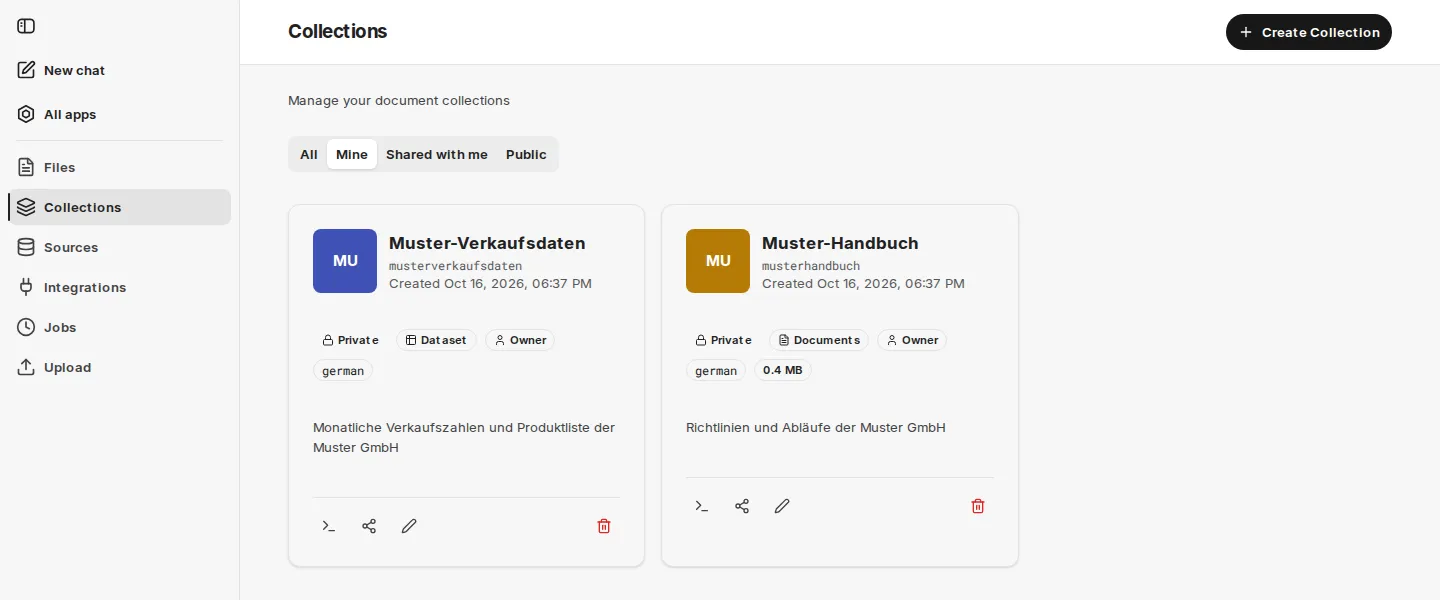
companyRAG user interface
Section titled “companyRAG user interface”companyRAG uses the shared interface of the CompanyGPT addons: on the left the sidebar with New chat and All apps, below it the areas of companyRAG, and at the bottom your account with theme and language. The interface is available in German and English.
The companyRAG sidebar contains the following areas:
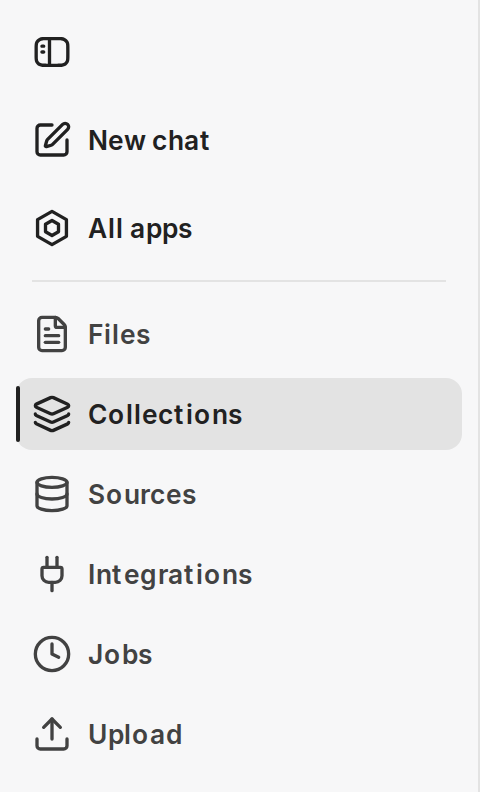
- Files – all indexed files with their status
- Collections – storage locations for documents and permissions
- Sources – automatic synchronization from connected systems
- Integrations – connections to SharePoint, Nextcloud, Google Drive, WebDAV, FTP, GitHub and Webcrawl
- Jobs – indexing jobs and their status
- Upload – index single or multiple files manually
Below a divider follow the administration areas:
- API Keys (administrators only)
- Audit Logs (super admins only)
Rights and roles
Section titled “Rights and roles”What you may do in a collection depends on your role in that collection (Viewer, Admin or Owner, see Collections). On top of that there are three rights for companyRAG as a whole:
| Right | Meaning |
|---|---|
| Use | Open companyRAG and search the collections you have access to. |
| Administrator | In addition, create and revoke API keys. You still maintain the content of collections through your role in each collection. |
| Super admin | In addition, see and manage all collections of the organization and view the audit logs. Even a super admin cannot read the files of other people’s collections. |
Your organization decides who receives which right. If your environment controls access through companyADMIN, administrators grant the rights there under Extensions as Use knowledge, Manage RAG settings and Superadmin. The Superadmin right is never granted automatically, not even to administrators.
Further topics
Section titled “Further topics”- Structured data from documents – extract typed fields from recurring document types
- Dataset collections – import tables or fill them live via an endpoint
- OKF bundles – knowledge collections as Markdown in GitHub or SharePoint
- Using companyRAG in CompanyGPT – the
ai-searchMCP server, its tools and agents - companyRAG API – programmatic access to files, collections, jobs and sources