
Collective knowledge and knowledge graph
The collective knowledge (Gesamtwissen, shown as Collective knowledge in the English interface) answers a question across everything you may read: pages from projects, documents from collections, and the pages and hints about tables. It never shows rows of a table; for that there are the SQL tools.
The collective knowledge appears in the companyRAG navigation above Documents; with project knowledge switched on, the start page opens the knowledge graph. It has the tabs Knowledge graph, Browse and Settings. An administrator can switch the collective knowledge off together with project knowledge (see Project knowledge).
What is searched
Section titled “What is searched”- Collections that belong to you or were shared with you are included. Under Settings you take a collection out with the In collective knowledge switch (muted). A muted collection stays directly searchable.
- Public collections of others are only included if you take them in under Public collections. Until then they are merely available.
- A search in a project covers the project and the collections linked to it, each only if you may read it yourself.
- Results are sorted by relevance. If a collection does not answer in time, it is named as skipped.
- The collection menu narrows the search to individual collections; a search field on every collection page searches only that collection.
The collective knowledge never shows more than the sources allow: collection rights and the permissions of individual files apply to every hit.
Knowledge graph
Section titled “Knowledge graph”The knowledge graph is the map of your knowledge. It only shows what you may read right now: nodes, labels, numbers and connections exist only for content you may read.
Your view (ego graph)
Section titled “Your view (ego graph)”In the default view you (“Me”) are in the middle:
- The first ring holds the collections you may read, each with your role (Viewer, Editor, Owner). Muted collections are marked instead of hidden.
- The second ring shows the sources of each collection and summary nodes for Entries, Knowledge pages, Tables and Files. A click on a summary node loads its elements page by page; nothing is cut off.
The size of a collection and the line width show the amount of data in the files and entries you may read. Knowledge pages and tables do not count. The legend filters by kind and source type.
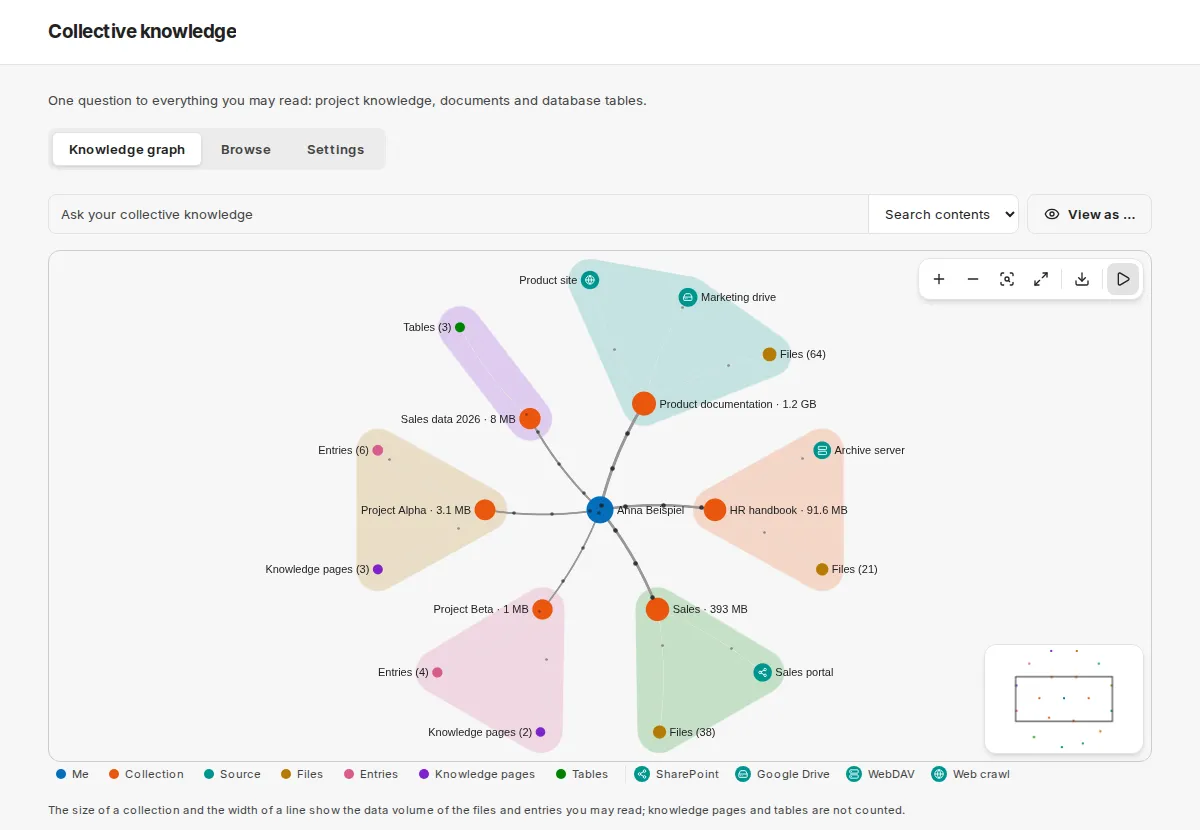
One collection in the centre
Section titled “One collection in the centre”On the Knowledge page of a collection, the graph shows the collection in the middle with its sources, entries, pages and tables. A collection you may not read does not exist there.
Searching and controls
Section titled “Searching and controls”- The search field runs the real collective-knowledge search (from three characters; Enter searches immediately, Escape clears). Hits appear in the graph with their path from the collection through the source to the hit; the list shows five rows and Show all. Alternatively you filter by name.
- The toolbar offers zoom, fit, full screen, PNG export, Hide muted and animation. The animation pauses if your system has “reduce motion” set.
- For every node the side panel shows details and actions. A list below the graph contains the same nodes as links.
Access overview for administrators
Section titled “Access overview for administrators”Under View as …, global administrators see which collections a person reaches with which role and by which route – without content. Collections the administrator may not read appear only as “Collection without your read rights” with role and route, without name and numbers. Every view is logged; a link to a person’s view loads only after you confirm.